Guide to Anti-Debugging - Overview , Techniques and Approaches

Guide to Anti-Debugging - Overview , Techniques and ApproachesI have been nagged a lot regarding guest posts, and almost 90% of them are related to some news, social media bullshit and half baked security crescendo. Until recently, I was contacted by amiable folks at Infosec Institute with a good article on Anti Debugging. This is an article by  Dejan Lukan, a security researcher at Infosec Institute, in which he discusses the Anti Debugging techniques in an objective and direct manner. I loved the implementation part, reminded me of my rev days (you can learn about how to reverse Winrar or just have a look at a real noobs guide to reverse some more stuff) , and more importantly Dejan explains how to stop (read : slow down) people from reversing your code. Hope you will enjoy it.

Before we begin, we must mention that it’s impossible to completely prevent reversing. What is possible is that we can place as many obstacles on the way as we want to make the process slow enough that reverse engineers will give up. Actually there are hardware implementations where you can buy a black box that attaches to your computer which can do the encryption/decryption for you, but this is far from being used in everyday life.
Techniques to Harden Reverse Engineering

The most basic approaches to harden the reverse engineering of programs are the following [1]:
  1.          Eliminating Symbolic Information
  2.          Obfuscating the Program
  3.          Embedding Antidebugger Code
When eliminating symbolic information, we’re taking the textual information from the program, which means we’re striping all symbolic information from the program executable. In bytecode programs, the executable often contains large amounts of internal symbolic information such as class names, class member names, the names of instantiated global objects. By removing every symbol from the executable or by renaming every symbol, the reverser is faced with a bigger problem than usual because symbol names alone can often be used to gather enough information about what the function does, which simplifies the reverse engineering part.
This can easily be done in C/C++ programs where we only have to append a few compiler flags to the command line that actually compiles the program into the executable. It’s much harder with programming languages like Java and .NET, where those symbols are used internally to reference variables, functions, etc. This is also the reason why Java and .NET programs can easily be converted into a pretty good source code of the original program. We can still strip the symbols from such programs by renaming all the symbols from their meaningful names into meaningless representations, which effectively does the job.
Besides stripping the executable symbols, we can also obfuscate the program. When obfuscating a program, we’re basically changing the code of the program without actually changing the logic behind it, so the program does the same as before but its code is far less readable. Here we have two techniques that can achieve that:
  •  Encoding: With encoding, we must add the decoding instructions that decode the whole program before it’s being run. This can be done by appending the decoding instruction at the end of the program and changing the entry point to point to the decoding instructions. When the program is run, the decoding instructions are executed first, which decodes the whole program into its original form. After that, we must jump to the start of the program and actually run the original instructions as if the encoding didn’t even happen.
  • Packing: When packing the executable, we’re basically reducing the size of the executable as well as encrypting it. When such a program is run, it must first be decoded in memory and then run.
  • By obfuscating the program with nonstandard encoders/packers, we can greatly complicate the task of reverse engineering the executable, but at the end, a persistent reverse engineer will nevertheless be able to bypass that and get the non-obfuscated version of the executable, which can easily be reversed.
Last but not least, we can use an antidebugger code, where we can include a code into the executable that can detect if the program is currently being debugged. If that happens, the program terminates itself prematurely without actually executing the functions that would normally be executed if it wasn’t running under a debugger.
Antidebugging

Before discussing how anti-debugging tricks do their magic, we must first talk about how the debugger is able to debug the program. We know that we can stop and resume the program with the use of either software or hardware breakpoints.
When using software breakpoints, we’re replacing the instruction on which we’ve set the breakpoint with the INT 3 instruction (at least on the x86 architecture), which is a special software interrupt. In this case, we’re passing the value 3 to the instruction INT, which means that we’re generating the software interrupt 3. This causes the function pointed to by the 3rd vector in the interrupt address table (IAT) to be executed. I guess we’re all familiar with the INT 80 interrupt that makes a system call on Linux systems.
The INT 3 instruction temporarily replaces the current instruction in a running program. This is also a way for the debugger to know that a software breakpoint has occurred and the program execution should be stopped. After that, the debugger replaces the INT 3 instruction with the original instruction so the program can continue without the loss of instructions, which can otherwise cause abnormal program behavior.
When we use a hardware breakpoint, it’s the processor’s job to know when the breakpoint has been hit and the program has to be stopped. This is why the program is not modified when a hardware breakpoint is set.
When the breakpoint is hit, the program is stopped and we can safely execute instructions in our favorite debugger. At that point, we can run instructions step-by-step by entering into functions, or by executing them the same time. If we’re interested in what the function does, we need to enter into the function; otherwise we can safely ignore the function and step over it. When stepping through the code, each instruction is executed on its own and then the program is again stopped, so we’re able to analyze what the instruction has just done.

When stepping through the code with a debugger, the Trap Flag (TF) in the EFLAGS register is used. When the TF is enabled, an interrupt will be generated after every executed instruction, so we get the feeling of stepping though the program instruction by instruction.

IsDebuggerPresent

The IsDebuggerPresent is a Windows API function, which we can see on the picture below:
Guide to Anti-Debugging - Overview , Techniques and Approaches

The function doesn’t take any arguments and returns a Boolean value notifying us whether the program is running under a debugger or not. This function can be used to trivially detect whether a debugger is being used to run the program. The function uses the Process Environment Block (PEB) to get information about whether the user-mode debugger is used.
Let’s create a simple program that prints the number 0 or 1 if the debugger is present or not. We can do that by first creating an empty console project under Visual Studio C++ and then changing the code of the main cpp file into the following:
1
2
3
4
5
6
7
8
9
10
11
12
13
14
15
16
17
18
19
20
21
22
23
24
// isdebuggerpresent.cpp : Defines the entry point for the console application.
//

#include "stdafx.h"
#include <stdio.h>
#include <Windows.h>

int _tmain(int argc, _TCHAR* argv[])
{
    int num;
    if(IsDebuggerPresent()) {
        num = 0;
    }
    else {
        num = 1;
    }

    printf("Number: %d\n", num);

    /* wait */
    getchar();

    return 0;
}

The program prints “Number: 0″ if the debugger is present and “Number: 1″ if the debugger is not. If we run the application under Visual Studio, the program will display the number 0 because it’s being run under a debugger. This can be seen on the picture below:
Guide to Anti-Debugging - Overview , Techniques and Approaches

Let’s also run the program under OllyDbg to be sure that the number 0 is displayed. This can be quickly confirmed by loading the executable program and running it. On the picture below, we can see that the number 0 was printed when the program was run under OllyDbg debugger:

But if we run the same program under normal cmd.exe, it will display the number 1. This can be seen on the picture below:
Guide to Anti-Debugging - Overview , Techniques and Approaches

We can see that the IsDebuggerPresent API function call works as expected, but that the function call is easy to detect and bypass. This is because we can quickly find this function call in the executable and delete it or bypass it. To do this, we can simply open the executable in Ida debugger and check out the Imports table to verify if that function exists somewhere in there. We’re right, the function IsDebuggerPresent is listed among all the imported functions as we can see on the picture below:
Guide to Anti-Debugging - Overview , Techniques and Approaches

This is a clear indication that the executable is using the function to do something different when the debugger is attached to the executable. We can also locate the exact instructions that are used to call that function. The whole Ida graph of the main function that does exactly the same as the main function from the C++ source code above is presented on the picture below:
Guide to Anti-Debugging - Overview , Techniques and Approaches

We can see that, at first, we’re initializing the stack for the function and calling the IsDebuggerPresent function. After that, we’re testing the returned value in eax against itself to determine whether a true or false value was returned. If the eax holds a value different than 0 (1 in our case), then the zero flag will be set and the first box that sets the [ebp+num] to 0 is called. This is exactly what happens now, because we’re running the program under a debugger, but otherwise the block that sets the [ebp+num] to 1 is called. After that, we’re just moving the value of [ebp+num] into the register eax and printing it with the printf function.
If we now set the breakpoint on the call to the IsDebuggerPresent function and rerun the program, the execution will be stopped right where we want it. After the breakpoint has been hit, we can step into the function to see what the function actually does. On the picture below, we can see the function in question:
Guide to Anti-Debugging - Overview , Techniques and Approaches

We can see that the function is pretty simple: we’re loading the address of the currently active thread (TIB) in the register eax and then accessing the structure member that’s located at the 0×30 offset; the PEB data structures lies at that offset. After that, we’re loading the address of PEB in eax and then accessing its data member at 0×2 offset, which holds the data member named BeingDebugged. Thus, we’ve successfully taken a look at what the IsDebuggerPresent function actually does and how it does it. We can see that it’s very simple and not really hard to bypass.

We can determine that IsDebuggerPresent is being used when we try to reverse engineer an executable and the program terminates prematurely, a different execution path is taken, or something else unexpected happens. In such cases, we must first check the Imports table if the IsDebuggerPresent function is being called anywhere in the executable. If that is the case, we can simply delete the instructions that call the IsDebuggerPresent function call, so it won’t bother us when reversing the executable.
On the other hand, if we’re developing a program and we would like to use the IsDebuggerPresent function call, we can copy the above instructions directly into our code, so that we’re not actually calling the IsDebuggerPresent function directly, but using its function body instructions to figure out whether the debugger is being used to run the executable. This is just another trick so that reverse engineers won’t immediately notice the use of IsDebuggerPresent function call and will make the debugging slightly more complicated.
Conclusion

For a deeper understanding of reverse engineering, check out the reverse engineeringtraining course offered by the InfoSec Institute. In this article we’ve seen a few techniques to harden the reverse engineering process. The technique easiest to bypass is symbol elimination where we have to delete all the symbols presented in the executable. This effectively makes the names of the functions unavailable when debugging, which leaves it up to the debugger to properly name the functions. Another technique is program obfuscation, which can be a pretty simple operation like xoring the whole executable then running it, but it can also be pretty complicated. Things get further complicated if we’re using obfuscation with the anti-reversing techniques, which detects if the program is being reversed and terminates the program prematurely if so, greatly hardening the reverse engineering of the executable.
References:
[1]: Reversing: Secrets of Reverse Engineering, Eldad Eilam.

Hack Windows using winAUTOPWN 3.4 –Completing 4 years of windows hacking

winAUTOPWN has been an old favourite to automate windows hacking and vulnerability testing.  The project is the brainchild of Azim Poonawala of [C4]Closed Circuit Corporate Clandestine and saw its first release in 2009. Fast forward to 4 years; it has matured into a good exploitation framework with a plethora of options. As the Author states about it  -

Autohack your targets - even if you have consumed and holding a bottle of 'ABSOLUT' in one hand and absolute ease (winAUTOPWN) in the other.

In layman terms, winAUTOPWN is a unique exploit framework which helps in gaining shell access and pwning (aka exploiting vulnerabilities) to conduct Remote Command Execution, Remote File/Shell Upload, Remote File Inclusion and other Web-Application attacks. To add cherry on the top, it can also help in conducting multiple types of Denial of Service attacks on targets, furthermore, It can also be used to test effectiveness of IDS/IPS and other monitoring sensors/softwares.Hack Windows using winAUTOPWN 3.4 –Completing 4 years of autopwnage

You can -

  • Download winAUTOPWN from here / mirror
  • Read its documentation from here

5 software I cant live without on my laptop (Windows) – A look inside the self confessed geeks laptop and mindset

Hello fellas,

I purchased a new HP DM-3210AU machine in October, an amazing piece of hardware and one of the highest rated netbook/sub notebook of all time, and yes, I am quite impressed with its performance and capabilities. I finished my share of Call of Duty 4 on it, prepared GNS3 Topologies over it with ease and the machine chomped away everything like a no brainer. In case, ou have been wondering where I had been, you might like to read about it or want to join the Facebook page where I post more frequently .

Well..continuing to my desktop,here is how it looks : ) .

My Desktop - HP Dm3210 -5 software I cant live without on my laptop - theprohack.com

Well..then out of blue (and I think it was Redbull) I decided to write an article on 5 software I cant live without on my new machine , which allows me to simultaneously multitask on it with ease and efficiency.  Consider it as a follow up of Top 10 software I cant live without on my PC.

Windows Live Mail

Now here is one of the good things Microsoft has invented, the next generation of Outlook express, simple, easy to use, intuitive and FAST. Though you will argue why I don't use Mozilla Thunderbird over it , well..Mozilla thunderbird is almost takes the same amount of memory as its Windows counterpart, but is twice as slow in terms of interface, and speed matters to me much while checking emails, I do hope you will agree with me. Although I do hate the calendar feature of live (which is a pain due to various issues) but still, it does the primary job it was conceived for.

Download it from here.

Windows Live Email rocks -5 software I cant live without on my laptop - theprohack.com

Virtual Wifi Router

Again, an amazing piece of software that frees you from the headaches of Android Adhoc wifi patching and the likes of purchasing buggy paid software like Connectify for creating wifi network with ease. I was fed up of creating adhoc networks on Windows 7 and check that my HTC Wildfire (Cyanogen mod 7, version 2.3.7) was not able to properly detect it, there came Virtual Wifi Router to the rescue and trust me, its the best Wifi Network sharing software you will ever get. Highly recommended !!

Download Virtual Wifi Router

The best wifi sharing software - virtual wifi router -5 software I cant live without on my laptop - theprohack.com

K-Lite Mega Codec Pack

Power user friendly yet easy to install , this codec pack will just blow you away, no need to install any other x-y-z player to do the job if your windows media player can play everything (i actually like to keep my laptop clean and use it with minimum software) from the most popular formats to arcane ones..and even allows for great amount of tweaking using its ffdshow interface. link it up with Virtualdub and you have a true gem. Included tools like Gspot, mediainfo and more add the cherry to the already delicious cake . Again, no need of VLC (unless you are into multicast streaming, to confess, i am not much of a VLC fan) and no need of anything else, one codec pack to rule them all : ) .

Download from here

GNS3

I dont think I need to elaborate upon it, since the time I have joined Tulip Telecom, it has been a part and parcel o my life, simulation of complex network topologies and whacky late night experiments (you know about them if you have been following the facebook page) are all possible because of this open source tool. Be it Cisco or juniper, it handles it with ease and the best part is that its hackable, configurable and programmable till the last drop. I have my custom version running over windows (self compiled :) ), pair it with putty connection manager and you are good to go. Also, you might want to look at sample GNS3 tutorials I posted at Prohack or more at the Facebook page.

Download it from here

GNS3 topology with putty connection manager -5 software I cant live without on my laptop -  theprohack.com

Google Chrome

Now again..love it or hate it, yet I find chrome as indispensible as a browser, I had issues with Mozilla Firefox (old memory bastard) and Internet Explorer 9 (old bastard), Opera is a favourite but again, I had some issues with it again (opera link issues, broken plugins) , so I finally settled on chrome for general browsing and acceptable response times, but when it comes to testing some web based apps, i jump to Opera for the same for its intuitiveness. Trust me, when it comes to choose a browser, i call it as a choice between evils. So go with the lesser one Open-mouthed smile . You might also want to look at Google Chrome Easter eggs Smile

Download it from here

Well..that sums it up Smile I will be back with some more ramblings of mine.

Till then,

Stay Gold..

Rishabh Dangwal

Bing copies Google results - Google caught Bing red handed

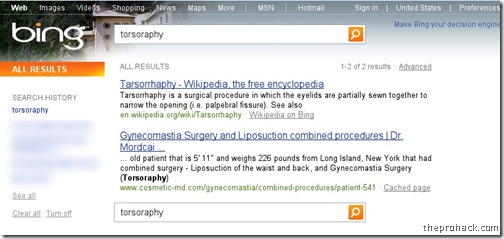
In an amazing post by Danny Sullivan , which details how Bing watches what people search on Google, Bing copies Google resultscopies it & uses  the information to improve its own results. Of course Microsoft denies it.. but what was novel was the spy hunt by Google to caught Bing red handed. It all started with “tarosorraphy”  which is a medical term for a rare surgical procedure on eyes, which was Googled in the summer of 2010 & was quirky enough to get Google’s attention. They corrected it , but what was peculiar was that Bing displayed the first correct result of Google without even a correction of spelling. As the official Google blog states -
Google returned the correct spelling—tarsorrhaphy—along with results for the corrected query. At that time, Bing had no results for the misspelling. Later in the summer, Bing started returning our first result to their users without offering the spell correction (see screenshots below). This was very strange. How could they return our first result to their users without the correct spelling? Had they known the correct spelling, they could have returned several more relevant results for the corrected query.
google
bing

The cycle continued with Bing displaying all types of unusual queries from Google. The Google started a hypothetical experiment to catch Bing in the act. This involved Google to insert 100 synthetic queries with random results in the Google search engine & then testing whether they appear in the Bing results or not. For example – “delhipublicschool40 chdjob” they inserted a credit union website link.
delhipublicschool40
Then they issued fresh laptops with IE8 installed with toolbar & searched for them. And voila, the results started to appear in Bing, which confirms the suspicion that -
  • Internet Explorer 8, which can send data to Microsoft via its Suggested Sites feature
  • The Bing Toolbar, which can send data via Microsoft’s Customer Experience Improvement Program


which as Google states is a cheap imitation & encourages to use Google as a primary search provider.
Those results from Google are then more likely to show up on Bing. Put another way, some Bing results increasingly look like an incomplete, stale version of Google results—a cheap imitation.
Also, they expect to have a fair competition.. with Microsoft..
So to all the users out there looking for the most authentic, relevant search results, we encourage you to come directly to Google. And to those who have asked what we want out of all this, the answer is simple: we'd like for this practice to stop.

Like this post ? "Join AlertPay"

source

Remove REGSVR.EXE and New Folder.exe viruses completely

Plug a pendrive into a public computer and you will be pesked by the continuously replicating “New Folder.exe” virus or Remove REGSVR.EXE and New Folder.exe viruses completely - thrprohack.comthe “regsvr.exe” virus. Hear my story, while I transferred my notes last night (around 600 folders) and I was surprised to  see that around 450 MB of space was eaten by these self replicating space eaters ! I was running Linux so these were not a concern for me, but when I plugged my pendrive into my virtual machine (windows xp sp3), it caused multiple problems of explorer corruption and disabling registry tools.

Time for some virus busting I guess..here is how you can remove “regsvr.exe” and “new folder.exe” from your computer.


Step 1 - Some Startup Repairs

First of all, boot into safe mode.After you get to your desktop,press F3 or Ctrl + F and search for “autorun.inf” file in your computer and delete all the subsequent files. I case you are no able to delete them, select all the files and uncheck the”Read Only” option. If you are still not able to delete them , you might want to try out Unlocker tool to delete the files.

Now go to

start – > run –> type ”msconfig

and press enter

Go to startup tab and uncheck “regsvr”, click ok and then click on “Exit without restart”.

Now go to

control panel –> scheduled tasks and delete “At1” task listed there.

Once done, close all windows.


Step 2 - Changing Configurations

Your registry might be disabled,and you need to activate it back to undo all the malicious changes done by worm.In order to do that, you need to go to

start – > run –> type ”gpedit.msc

and press enter

then navigate to

users configuration –> Administrative templates –> systems

Find “prevent access to registry editing tools” , double click it and change the option to disable.

you need to enable regedit using gpedit - theprohack.com

Once done, your Regedit will be enabled. In case your task manager is disabled, you need to enable it.


Step 3 - Registry Edits

Now we have to perform some registry edits to enable our explorer and to remove all instances of worm from the registry. Go to

start – > run –> type ”regedit

and press enter

Click on Edit –> Find and search for regsvr.exe . Find and delete all the occurrences of regsvr.exe virus (don't delete  regsvr32.exe as its not a virus).

then navigate to entry

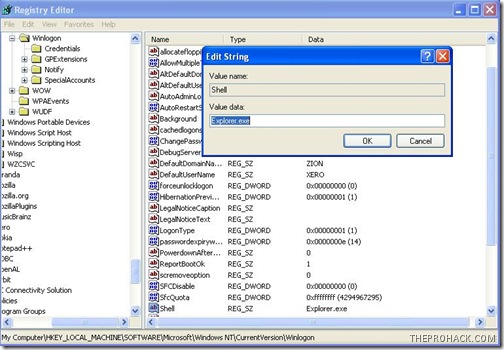
HKEY_LOCAL_MACHINE\SOFTWARE\Microsoft\Windows NT\CurrentVersion\Winlogon

and modify the entry

Shell = “Explorer.exe regsvr.exe”

You need to remove regsvr from registry - theprohack.com

to delete the regsvr.exe from it,so that it becomes

Shell = “Explorer.exe

Once done, close all windows and get ready to delete all virus files.


Step 4 - Deleting Virus Files

The final step is to delete all the virus files in your computer. To do this, Press F3 or Ctrl + F and search for regsvr.exe (make sure to search in hidden folders ) and delete all “regsvr.exe” “svchost .exe” files (notice the gap between ‘svchost’ and ‘.exe’, keep in mind you don't delete the legitimate file.).

Clean your recycle bin and restart your PC (perform a cold boot).

Volia..you have cleaned your computer from regsvr..just make sure to scan your pendrive the next time you plug in :)


Like This post ?  You can buy me a Beer :)

Posted by XERO. ALL RIGHTS RESERVED.

Windows 7 SP1 leaked in the wild

It has been confirmed that a beta copy of Microsoft's upcoming Windows 7 Service Pack 1 has been leaked on some  Windows 7 SP1 leakedTorrent sites. Folks at Redmond have yet to confirm a release date for Windows 7 SP1,despite that , a pre-release copy of the minor updates package appears to be unofficially available for download online.
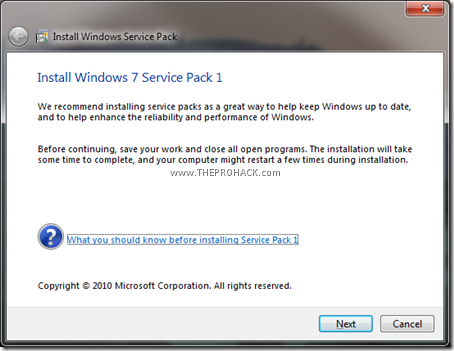
As The Register asked Microsoft that if it could comment on the apparent leak of the Windows 7 SP1 beta (build 6.1.7601.16537.amd64fre.win7.100327-0053), but Microsoft has still been unavailable to comment.This march,Microsoft’s Brandon LeBlanc commented in a blog post that Windows 7 will be receiving a service pack containing minor security updates and feature tweaks. However, no release date was stated with the post.

Windows 7 SP1 Beta leaked

last month as Microsoft revealed a more details about Windows 7 Service Pack 1, confirming it would involve a small-fry update to the operating system. As expected there aren't any significant changes in SP1, the biggest is the added RemoteFX functionality when paired with Windows Server. The but the install process is much faster than it was for service packs on Windows Vista. Microsoft as a company sticks to a pretty tight frame when it comes to operating updates and patches,based on this,we can fairly assume that Windows 7 SP1 will not be released until late 2010 at the very earliest.

PS: Dont download the beta from torrent sites, it might be rigged with trojans or custom code by potential virus writes. Wait for the original release.

The Register


Like This post ?  You can buy me a coffee :)


Posted by XERO. ALL RIGHTS RESERVED.

Microsoft + Open Source = ? . Redmond Giant to Embrace open source

Microsoft recently formed its opensource group under James Utzschneider,Microsoft's general manager of open source Microsoft + Open Source = ? . Windows Giant to Embrace open source which will directly report to the company number two, chief operating officer and aggressive compete-to-win-type Kevin Turner.The company will redefine its opensource strategy, much of which was initiated by Sam Ramji who left Mircosoft for family reasons,will now be getting a broader, cross-company view inside Microsoft's global business and marketing operations unit.

Over the years, Microsoft has tried to get on friendly terms with open source veterans and also made a number of donations and contributions to open source projects and Linux. These included a release of a pair of PHP patches under the Free Software Foundation's Lesser GPL license, the SQL Server Driver for PHP released under Microsoft's own Permissive License, the release by Microsoft of 20,000 lines of Windows kernel code under GPLv2 ( *alebit this move was clearly designed to bolster Windows as a hosting environment for servers running both Linux and Windows* )to improve performance and manageability of Linux running insider the company's Hyper-V, and the Windows Installer XML (WiX) toolset to SourceForge.

Open Source is good for me :)

According to Utzschneider, Microsoft has changed, but still Microsoft has a legacy of misinterpretations and bad blood. Who can forget the bar knuckled fight between Microsoft and Linux,the halloween memos, the hated get the facts campaign, Steve Ballmer’s claims that Linux is violating Microsoft’s patents… Utzschneider commented to change perceptions about the company that the company can't use "clever advertising or press."

"It has to be done with products and actions and behavior on a sustained basis across the company and across the ecosystem. I want the idea of Microsoft being proprietary and closed and not open to interoperating - I want that to disappear as an issue," he said.

On further probing he commented upon the code release policy which is underway which will enable ordinary coders to release code to open source based on Microsoft’s products. As of now, Microsoft aims at blurring the line between opensource and closed source giant,at least that's what Utzschneider claimed

"We are quite content to say: 'Here's the value from what we are presenting and here's the value from the comp products' but we are doing that without the religion of: 'Oh my God, there's two different worlds and you have to choose one - a world where you have to pay for software and one is weird and different and free.' That's what we've moved away from as a company.

"We have to teach our sellers how to talk about open source in a new way, and the overall theme is that it's OK for open-source products and Microsoft products to work together. There's a growing Microsoft ecosystem that we are going to encourage.

Lets see where all of this goes..I guess pigs do fly..


The Register


Posted by XERO . All rights Reserved

John the Ripper – Password cracking at its best

If you are into password cracking then you probably know about it,John the Ripper is one of the most popular password Crack passwords using john the ripper testing and breaking program available. JTR, as its fondly called ,combines multiple password cracking packages into one package,includes auto detection of hashes and is a fast password cracker. It is currently available for many flavors of Unix, Windows, DOS, BeOS, and OpenVMS and supports 15 different platforms . Its primary purpose is to detect weak Unix passwords ( no..I m kidding,Its primary purpose is to break passwords :P ).It can natively detect and crack various encrypted password formats including several crypt password hash types most commonly found on various Unix flavors (based on DES, MD5, or Blowfish), Kerberos AFS, and Windows NT/2000/XP/2003 LM hash. JTR has an active community and multiple third party patches have been added to increase its functionality to include MD4-based password hashes and passwords stored in LDAP, MySQL and others unsupported hashes. JTR is the penultimate when it comes to password cracking in windows (Cain and Abel is the ultimate :P), but for Linux and open source,its the best you can get your hands on.Fire it up with a wordlist and you are good to go
Here is a sample output of JTR in Debian environment (shamelessly taken from Wikipedia)
root@0[john-1.6.37]# cat wpass.txt
user:AZl.zWwxIh15Q
root@0[john-1.6.37]# john -w:password.lst wpass.txt
Loaded 1 password hash (Traditional DES [24/32 4K])
example         (user)


guesses: 1  time: 0:00:00:00 100%  c/s: 752  trying: 12345 - pookie


John the ripper GUI 


You can download JTR from here


PS : Like this article ? You can always support me by buying me a coffee or You can always try some of the cool merchandize from PROHACK.


POSTED BY XERO ALL RIGHTS RESERVED.


Google Nexus One Launch – Google Jumps Mobile

Google will be announcing its own smartphone and will finally jump into the mobile computing officially. The smartphone Google Nexus one Launch - rdhacker.blogspot.com named Nexus One will showcase the latest generation of the Linux-based open source Android operating system and will be directly marketed by Google itself. Designed by HTC it runs Android OS 2.1 which is a step up from older version 2.0.
The Nexus One is powered by a 1-GHz Snapdragon CPU, a 3.7-inch 480 x 800 display,5 Megapixel camera with LED flash, 512 MB of of RAM and an expandable 4-GB microSD card, The 1-GHz processor alone should make the Nexus one of the fastest smartphones available currently and it will have a stiff competition from the product offerings by Apple iPhone,Nokia,Palm and Blackberry.
Google Nexus One - rdhacker.blogspot.com
The Phone will be priced at about
  • 530$ Unlocked and
  • 180$ subsidized with a contract to commit for 2 years.
With Google jumping up in the mobile market,the biggest loser is Microsoft as HTC used to be its flagship company for its Windows mobile phones, and now its not. Overall,Nexus has less to suggest as a standard and set itself as a benchmark in the market due to the competitive offerings from other smartphone makers,unless Google baffles us with some nice welcoming tricks under its sleeves.

PS : Like this article ? You can always support me by buying me a coffee or You can always try some of the cool merchandize from PROHACK.

POSTED BY XERO ALL RIGHTS RESERVED.Google Blog.