How I got myself a capable laptop

It all started with my old (and very hated) HP Pavilion notebook (i5, 12 GB RAM, 500 GB HDD) almost dying on me. I wanted to get a new laptop, the only reason I stuck with HP for so many years was that I got it as a gift and I wanted to squeeze every drop of use I could get from it.

Well, let's get a new one then, and I wrote down what I needed -

Must have

  1. Good, tactile, backlit keyboard
  2. HDMI, not micro HDMI
  3. Screen less than 13 inches
  4. Good battery life

 Should have

  1. i5-i7 would do, AMD Ryzen as well
  2. Should be portable
  3. Easy to open, repair and upgrade
  4. USB 3.0
  5. RAM 8 GB or more
  6. 256 GB SSD or more

 Nice to have

  1. Should support extra battery
  2. SIM card slot
  3. Swivel support
  4. Graphics card
  5. MIL-STD-810G
  6. Fingerprint sensor for easy login

My options were quite limited considering what I needed would be automatically expensive - I was looking at spending at least INR 75000-100000 (USD ~1000-1300) to get a new one. That too a base model. 

I didn't mind buying a used one, if it served my purpose and was in good condition. I reached out to my connects in hardware segment and asked for their advice. 

A used Ferrari is always a Ferrari, a new ALTO will never match it.

Point well noted.

They referred me to leased laptop distributors, which typically have inventories of laptops which are leased to corporate for 2-3 years and then brought back once the contract is over. Since they are used, people are less inclined to buy them, but their configurations are top notch as compared to their retail consumer segment counterparts and they are built to repair. These laptops are then dismantled and their parts flood the after sales market. The distributors are more than happy if their laptops are sold before they are dismantled.

After having friendly chitchat with a lot of distributors, I finally narrowed my options to Lenovo X250 and an HP EliteBook. The keyboards were nice and tactile and the form factor was small. At one of the distributors, from a heap of laptops, I picked 2 and I asked the person if I can open it. He said why not, and he opened it for me. Both were in good condition, sporting 256 GB SSDs, 8 GB RAM, i5 5th gen processors and were costing INR 14000 (~USD 190), a far cry from new ones, but workable configuration. I asked about warranty and after a bit of negotiation, he agreed for a 1-year repair warranty for INR 2500 (~USD 34). Windows 10 pro was provided for free.

I was about to settle it for X250 one (as it had more ports, was smaller and checked almost everything I needed), one of associates waltzed in and said, "we just got a shipment of some new stock". I asked if I could take a look and they pointed me to next door.

From a heap of X260s I picked 3 - one with no battery and i7 6gen, one with an extra 6 cell battery with i5 6gen and one had 1 TB HDD. I asked if I could swap parts, and they said we don’t care, it’s all the same for us.

I took the extra battery and plugged it into i7 one. CPUZ said it had Skylake i7 6600u and Samsung 8 GB built in. It had 256 GB SSD and a working WWAN module (SIM module) as well. Single memory slot (DDR4, 260 pin SODIMM) but was easy to open and clean. After playing it with for 1 hour, post testing all the ports, modules, running some stress tests, and haggling a bit, I went home with a deal at INR 17000 (~USD 230) with 1-year warranty from distributor, Windows 10 pro bundled.

Then I did some research and checked the maximum RAM it supported - 16GB, 2133MHz DDR4, non-parity. Probably, enough for what I do. 2133 MHz is a bit hard to get by, so a better option was to buy 2666 MHz one since it will run automatically at 2133 Mhz. I did some research (read: going through Reddit threads, Lenovo forums) and found that one user was able to successfully upgrade it with 32 GB of RAM (M471A4G43MB1, costs around INR 27000/ ~USD 370 even more expensive than the laptop). Post upgrading to latest BIOS, I decided to take the risk and got myself a cheaper one (ADATA AD4S2666732G19, 32 GB RAM, 2666 MHz, INR 9000/ ~USD 122) from one of the distributors.

Went back home, disabled internal battery from BIOS, unscrewed & pried back cover and disconnected battery cable. Swapped out 8GB one with 32 GB one. Connected battery cable, power cable and was met with POST screen. Assembled everything back again and ran memtest86 and windows memory diagnostics. Everything was squeaky clean :). Hardened everything, installed virtual box, migrated my VMs, installed emulators and voila, my new system is ready.

I have been using X260 since last 6 months as my primary laptop with the following configuration which runs multiple VMs simultaneously, is used for maintaining remote infrastructure, occasional retro gaming/ emulation and occasional writing :  


  1. Tactile backlit keyboard
  2. 6th Gen Intel Core i7-6600U Processor, Turbo Boost 2.0 (3.4GHz)
  3. 32 GB memory (ADATA AD4S2666732G19)
  4. 12.5" HD (1366 x 768) IPS
  5. 256 GB Samsung SSD
  6. 3 Cell internal + 6 cell external battery
  7. SIM card slot (WWAN)
  8. 3 USB 3.0 ports (Superspeed)
  9. 1 HDMI/ 1 Mini DisplayPort
  10. 4-in-1 Card Reader (MMC, SD, SDHC, SDXC)
  11. Intel I219 Gigabit LAN & Dual Band Wireless-AC 8260, with Bluetooth® 4.1
  12. MIL-STD-810G compliant
  13. Weighs around 1.5 KG
  14. Bundled Windows 10 Pro

Total Cost - INR 26000 / ~USD 352

Lessons learnt –

  1. Research, hunt and haggle
  2. Be very specific about your requirements
  3. Technology evolves every day, see what fits your needs on a long-term basis

The Rescure Cyber Threat Intelligence Project - Domain Blacklist Update

We are now publishing consumable list of malicious domains at rescure.me as part of our independent cyber threat intelligence project.

Each node below is an event with its separate attributes (around 2 million) which are co-related in real-time to ensure only offending, malicious domains are listed at the portal. The current domain list size is around 18 thousand (! and growing) which is updated at the frequency of 4 hours at 
https://rescure.me/rescure_domain_blacklist.txt
Rescure Cyber Threat Intelligence Domain Blacklist
Rescure Cyber Threat Intel Domain List Simulation
As always, feedback is appreciated at support@fruxlabs.com

REScure Cyber Threat Intelligence Feed

We are now generating a daily blacklist of malicious IPs via our own threat intel solution. The feed will be generated every 6 hours and is now available at
https://rescure.me
The below snapshot is the end result of the penultimate stage of co-relation of millions of data points that are finally grouped into attack groups before they are published at rescure.me
Cyber Threat Intelligence co-relation rescure.fruxlabs.com
Co-Relation snapshot at REScure Feed
You are encouraged to try it and consume it into your security solutions. Since this is in beta, we are limiting it to only IPs.
REScure Cyber Threat Intelligence Feed
Yep, REScure may look like this to your SIEM
We are alpha testing API access, detailed Indicators of Compromise access, STIX/TAXII/OpenIOC exports, realtime refresh rates and a lot more. This is an independent project we undertook to enhance our understanding of underlying architecture of distributed systems, the nature of threat intelligence and how to efficiently collect/store/consume/distribute it.

The project is being jointly developed with Sreyash and Eshan.

Your feedback is appreciated, please share it at support@fruxlabs.com.

How I turned my phone into a hacking machine

There are probably hundreds (if not thousands) of tutorials on this, but since I wanted a portable, non rooted, disposable hacking device which has the ability to take calls (a.k.a a cellphone/smartphone), I decided to mod an android based device. I have done this earlier (probably 5 years back) by installing arch on my android phone on a separate partition and booting it. This can be done today as well but since I do not want to root my cellphone, and do not want to use proot/LibSDL, I decided to see what can be done in a non rooted environment.

Intended audience for this piece - anyone having a bit hands experience on linux. Consider this as my personal cliffnotes in case I have to do it again. Let me even include an age old Disclaimer (taken from XDA aeons ago):
I am not responsible for bricked devices, dead SD cards, thermonuclear war, or you getting fired because the alarm app failed. Please do some research before running commands. YOU are choosing to make these modifications, and if you point your finger at me for messing up your device, I will laugh at you.
My iPhone recently went kaput during a fated trip to Jubail, KSA, and I zeroed on an inexpensive, capable device (Motorola G4 Play for around ~120 USD) for which I won't feel bad in case it gets lost or breaks into a million pieces.

Well, the device specs are average, the phone feels rugged and the battery can be taken out by simply removing the cover (which is EXTREMELY important for me). It comes with Android 6.0 and probably will never get updated to Android 7.0 (owing to Lenovo's shitty firmware update cadence), but once I disabled a lot of applications, the phone feels quick and is a joy to use.

First things first -
Disabled : Chrome, Cloud Print, Device Help, Drive, File Manager, FM Radio, Google Japanese/Korean/Pinyin/Zhuyin Input, Google Play Movies, Google Play Music, Google Hangouts, Messenger, Photos, other motorola bloatware.

Doublecheck device administrators. I would have removed a lot more software but then, I will also be using this phone for making calls and for light personal use as well.

Installed : Firefox (with Ublock), ESFile Explorer, Termux, Hacker's Keyboard, Textra (for SMS), Quickpic, OpenVPN, SMS Backup+, FastHub (or Github), Fing (quick GUI based network discovery), Flud (Torrents), Google Authenticator, AndFTP, drozer agent, Packet Capture (Application specific packet capture), TOR and Phonograph (lightweight music application).

Once the device's innards are replaced with a bit more capable/lightweight software, I launched Termux which is probably the most important terminal emulator written for android. From its website
"Termux is an Android terminal emulator and Linux environment app that works directly with no rooting or setup required. A minimal base system is installed automatically; Additional packages are available using the APT package manager. "
Onwards we go.
  • I started by updating Termux and its inherent environment - apt update && apt upgrade
  • Installed python2, python3, nmap, openssh, git, python-pip,htop through relevant apt commands.
  • Installed metasploit through https://github.com/Auxilus/Auxilus.github.io/blob/master/metasploit.sh (turns out this script has been stolen by a lot of folks, like this guy over here, and this one for youtube likes).
  • Installed scapy.
  • Generated OpenSSH keys, configured OpenSSH to run into server mode so that I can login into my cellphone if required. Make sure you check the username with whoami before generating keys. Putty aficionados may want to convert id_rsa keys using puttygen before loading it.

  • Configured OpenVPN application to connect to my remote server. Added TOR support.
  • Authenticated Fasthub Application with my Github account through a personal access token.
  • Tested everything.
  • Generated a list of packages for later use by running the following command "dpkg --get-selections | cut -f1 > bkup_pack.txt". 
  • Took tar backup of current Termux installation for later use, I admit it is a quick and dirty hack but it works. Yes, I tested it.
cd /data/data/com.termux/files
tar -cvzf /sdcard/Download/termux.tgz --owner=0 --group=0 home usr
For more adventurous souls, you can go ahead with a rootfs option - https://github.com/xeffyr/Termux-RootFS. A simple tutorial for this would be here, however during my experiments, I found it to be buggy and some applications do not work properly. Since I value stability and security over everything, I promptly reverted back to my old fs.

Does everything works? Hell yeah.

Turn your phone into a hacking machine - Device statistics


Turn your phone into a hacking machine - Metasploit and python HTTP server


Turn your phone into a hacking machine - Running scapy

Turn your phone into a hacking machine - access github


To do : 
  1. Something about postgre stability, the sucker generally has connection issues.
  2. Improve documentation
  3. Harden device (CIS/STIG)

Download Kinect Virtual Dressing Room - Weekend project

It was getting hot at Doha, Qatar and I was thoroughly bored. And tired.

Out of blue a creative request came by one of my seniors that if I have ever worked on Unity 3D. Though I have some experience with game engines and modeling tools, i though it would be worth a try. As an absolute beginner, I tried my hands on Unity 3D and was able to compile Virtual Dressing Room for Kinect (code courtesy Anthony heckmann - Github). I updated some code and calls (for instance  gettrianglestrip and settrianglesstrip to gettriangles and settriangles) for compatibility with latest release of Unity. As of now, have not tested it with a real Kinect although the executable works fine. Thanks to this project, I also got my hands on Kinesis.io.


You can download the executable from here . As usual, expect no support if you experience bugs as :

  1. Its my weekend project
  2. I have not tested it with a real Kinect.
  3. I have too much on my plate right now.
Password is Prohack

An Introduction to SwiftNET - An overview you always wanted

An Introduction to SwiftNET - An overview you always wanted
Due to recent onslaught of attacks on SWIFT network, I thought why not to release a small introduction on the same. Here it is then gentlemen -An Introduction to SwiftNET you always wanted. I have tried to keep it as simple as possible whilst ensuring the information is complete and relevant. Hope you will find it userful.


As usual, comments, questions and critique are welcome.

Fortigate SSH Backdoor Password Calculator

Recently Fortinet confirmed there was a backdoor in their firewalls which impacted FortiGate OS Version 4.x -  5.0.7. An exploit was released in the wild but it took some efforts to work with (I am looking at you : paramiko/termios/msvcrt). So I ported the code to create a quick and dirty password calculator that will help in pwning Fortinet firewalls with vulnerable versions.

Tested it on test firewalls and it works like a charm : )

https://packetstormsecurity.com/files/136430/Fortigate-Backdoor-Password-Calculator.html


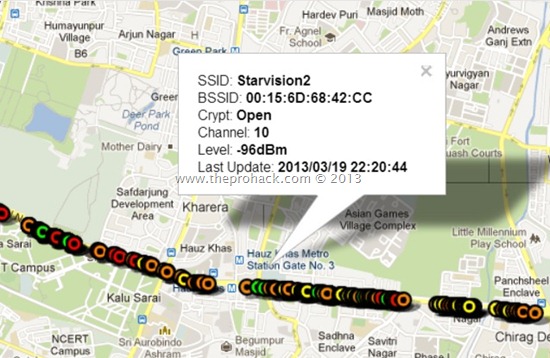
Wardriving at Delhi Updated –The OPEN, WEP & WPA faces of Delhi

I got an overwhelming response to my Wardriving at Delhi project and have got a lot of emails regarding the same. I am so thrilled that so many people want to contribute to the project. Inspired by your feedback, I am here by producing here an update to my mapping project. This time I went Via Saket to Gurgaon and as usual I got a lot of access points which were OPEN with no security, WEP secured vulnerable access points & WPA/WPA PSK2 secured points.
 Wardriving at Delhi Updated - The OPEN,WEP and WPA
As usual, I used -
The target is to make a map of Delhi with all the access points  to analyse in layman terms -
  1. The security awareness of people and organizations
  2. The devices they are using
  3. The security mechanisms they are using.
  4. Wifi range analysis of individual device.
Well, in all you can find the data from below links -
If you are interested in contributing to the data, please contact me at admin<at>theprohack.com . You can also read how to Hack Wifi using Backtrack , How to detect if someone is using your WiFi  or how to detect WiFi hotspots . If you are having an Android, you can also read about how to use your Android for Wardriving.

Happy Wardriving.