How I got myself a capable laptop

It all started with my old (and very hated) HP Pavilion notebook (i5, 12 GB RAM, 500 GB HDD) almost dying on me. I wanted to get a new laptop, the only reason I stuck with HP for so many years was that I got it as a gift and I wanted to squeeze every drop of use I could get from it.

Well, let's get a new one then, and I wrote down what I needed -

Must have

  1. Good, tactile, backlit keyboard
  2. HDMI, not micro HDMI
  3. Screen less than 13 inches
  4. Good battery life

 Should have

  1. i5-i7 would do, AMD Ryzen as well
  2. Should be portable
  3. Easy to open, repair and upgrade
  4. USB 3.0
  5. RAM 8 GB or more
  6. 256 GB SSD or more

 Nice to have

  1. Should support extra battery
  2. SIM card slot
  3. Swivel support
  4. Graphics card
  5. MIL-STD-810G
  6. Fingerprint sensor for easy login

My options were quite limited considering what I needed would be automatically expensive - I was looking at spending at least INR 75000-100000 (USD ~1000-1300) to get a new one. That too a base model. 

I didn't mind buying a used one, if it served my purpose and was in good condition. I reached out to my connects in hardware segment and asked for their advice. 

A used Ferrari is always a Ferrari, a new ALTO will never match it.

Point well noted.

They referred me to leased laptop distributors, which typically have inventories of laptops which are leased to corporate for 2-3 years and then brought back once the contract is over. Since they are used, people are less inclined to buy them, but their configurations are top notch as compared to their retail consumer segment counterparts and they are built to repair. These laptops are then dismantled and their parts flood the after sales market. The distributors are more than happy if their laptops are sold before they are dismantled.

After having friendly chitchat with a lot of distributors, I finally narrowed my options to Lenovo X250 and an HP EliteBook. The keyboards were nice and tactile and the form factor was small. At one of the distributors, from a heap of laptops, I picked 2 and I asked the person if I can open it. He said why not, and he opened it for me. Both were in good condition, sporting 256 GB SSDs, 8 GB RAM, i5 5th gen processors and were costing INR 14000 (~USD 190), a far cry from new ones, but workable configuration. I asked about warranty and after a bit of negotiation, he agreed for a 1-year repair warranty for INR 2500 (~USD 34). Windows 10 pro was provided for free.

I was about to settle it for X250 one (as it had more ports, was smaller and checked almost everything I needed), one of associates waltzed in and said, "we just got a shipment of some new stock". I asked if I could take a look and they pointed me to next door.

From a heap of X260s I picked 3 - one with no battery and i7 6gen, one with an extra 6 cell battery with i5 6gen and one had 1 TB HDD. I asked if I could swap parts, and they said we don’t care, it’s all the same for us.

I took the extra battery and plugged it into i7 one. CPUZ said it had Skylake i7 6600u and Samsung 8 GB built in. It had 256 GB SSD and a working WWAN module (SIM module) as well. Single memory slot (DDR4, 260 pin SODIMM) but was easy to open and clean. After playing it with for 1 hour, post testing all the ports, modules, running some stress tests, and haggling a bit, I went home with a deal at INR 17000 (~USD 230) with 1-year warranty from distributor, Windows 10 pro bundled.

Then I did some research and checked the maximum RAM it supported - 16GB, 2133MHz DDR4, non-parity. Probably, enough for what I do. 2133 MHz is a bit hard to get by, so a better option was to buy 2666 MHz one since it will run automatically at 2133 Mhz. I did some research (read: going through Reddit threads, Lenovo forums) and found that one user was able to successfully upgrade it with 32 GB of RAM (M471A4G43MB1, costs around INR 27000/ ~USD 370 even more expensive than the laptop). Post upgrading to latest BIOS, I decided to take the risk and got myself a cheaper one (ADATA AD4S2666732G19, 32 GB RAM, 2666 MHz, INR 9000/ ~USD 122) from one of the distributors.

Went back home, disabled internal battery from BIOS, unscrewed & pried back cover and disconnected battery cable. Swapped out 8GB one with 32 GB one. Connected battery cable, power cable and was met with POST screen. Assembled everything back again and ran memtest86 and windows memory diagnostics. Everything was squeaky clean :). Hardened everything, installed virtual box, migrated my VMs, installed emulators and voila, my new system is ready.

I have been using X260 since last 6 months as my primary laptop with the following configuration which runs multiple VMs simultaneously, is used for maintaining remote infrastructure, occasional retro gaming/ emulation and occasional writing :  


  1. Tactile backlit keyboard
  2. 6th Gen Intel Core i7-6600U Processor, Turbo Boost 2.0 (3.4GHz)
  3. 32 GB memory (ADATA AD4S2666732G19)
  4. 12.5" HD (1366 x 768) IPS
  5. 256 GB Samsung SSD
  6. 3 Cell internal + 6 cell external battery
  7. SIM card slot (WWAN)
  8. 3 USB 3.0 ports (Superspeed)
  9. 1 HDMI/ 1 Mini DisplayPort
  10. 4-in-1 Card Reader (MMC, SD, SDHC, SDXC)
  11. Intel I219 Gigabit LAN & Dual Band Wireless-AC 8260, with Bluetooth® 4.1
  12. MIL-STD-810G compliant
  13. Weighs around 1.5 KG
  14. Bundled Windows 10 Pro

Total Cost - INR 26000 / ~USD 352

Lessons learnt –

  1. Research, hunt and haggle
  2. Be very specific about your requirements
  3. Technology evolves every day, see what fits your needs on a long-term basis

The Rescure Cyber Threat Intelligence Project - Domain Blacklist Update

We are now publishing consumable list of malicious domains at rescure.me as part of our independent cyber threat intelligence project.

Each node below is an event with its separate attributes (around 2 million) which are co-related in real-time to ensure only offending, malicious domains are listed at the portal. The current domain list size is around 18 thousand (! and growing) which is updated at the frequency of 4 hours at 
https://rescure.me/rescure_domain_blacklist.txt
Rescure Cyber Threat Intelligence Domain Blacklist
Rescure Cyber Threat Intel Domain List Simulation
As always, feedback is appreciated at support@fruxlabs.com

REScure Cyber Threat Intelligence Feed

We are now generating a daily blacklist of malicious IPs via our own threat intel solution. The feed will be generated every 6 hours and is now available at
https://rescure.me
The below snapshot is the end result of the penultimate stage of co-relation of millions of data points that are finally grouped into attack groups before they are published at rescure.me
Cyber Threat Intelligence co-relation rescure.fruxlabs.com
Co-Relation snapshot at REScure Feed
You are encouraged to try it and consume it into your security solutions. Since this is in beta, we are limiting it to only IPs.
REScure Cyber Threat Intelligence Feed
Yep, REScure may look like this to your SIEM
We are alpha testing API access, detailed Indicators of Compromise access, STIX/TAXII/OpenIOC exports, realtime refresh rates and a lot more. This is an independent project we undertook to enhance our understanding of underlying architecture of distributed systems, the nature of threat intelligence and how to efficiently collect/store/consume/distribute it.

The project is being jointly developed with Sreyash and Eshan.

Your feedback is appreciated, please share it at support@fruxlabs.com.

How I turned my phone into a hacking machine

There are probably hundreds (if not thousands) of tutorials on this, but since I wanted a portable, non rooted, disposable hacking device which has the ability to take calls (a.k.a a cellphone/smartphone), I decided to mod an android based device. I have done this earlier (probably 5 years back) by installing arch on my android phone on a separate partition and booting it. This can be done today as well but since I do not want to root my cellphone, and do not want to use proot/LibSDL, I decided to see what can be done in a non rooted environment.

Intended audience for this piece - anyone having a bit hands experience on linux. Consider this as my personal cliffnotes in case I have to do it again. Let me even include an age old Disclaimer (taken from XDA aeons ago):
I am not responsible for bricked devices, dead SD cards, thermonuclear war, or you getting fired because the alarm app failed. Please do some research before running commands. YOU are choosing to make these modifications, and if you point your finger at me for messing up your device, I will laugh at you.
My iPhone recently went kaput during a fated trip to Jubail, KSA, and I zeroed on an inexpensive, capable device (Motorola G4 Play for around ~120 USD) for which I won't feel bad in case it gets lost or breaks into a million pieces.

Well, the device specs are average, the phone feels rugged and the battery can be taken out by simply removing the cover (which is EXTREMELY important for me). It comes with Android 6.0 and probably will never get updated to Android 7.0 (owing to Lenovo's shitty firmware update cadence), but once I disabled a lot of applications, the phone feels quick and is a joy to use.

First things first -
Disabled : Chrome, Cloud Print, Device Help, Drive, File Manager, FM Radio, Google Japanese/Korean/Pinyin/Zhuyin Input, Google Play Movies, Google Play Music, Google Hangouts, Messenger, Photos, other motorola bloatware.

Doublecheck device administrators. I would have removed a lot more software but then, I will also be using this phone for making calls and for light personal use as well.

Installed : Firefox (with Ublock), ESFile Explorer, Termux, Hacker's Keyboard, Textra (for SMS), Quickpic, OpenVPN, SMS Backup+, FastHub (or Github), Fing (quick GUI based network discovery), Flud (Torrents), Google Authenticator, AndFTP, drozer agent, Packet Capture (Application specific packet capture), TOR and Phonograph (lightweight music application).

Once the device's innards are replaced with a bit more capable/lightweight software, I launched Termux which is probably the most important terminal emulator written for android. From its website
"Termux is an Android terminal emulator and Linux environment app that works directly with no rooting or setup required. A minimal base system is installed automatically; Additional packages are available using the APT package manager. "
Onwards we go.
  • I started by updating Termux and its inherent environment - apt update && apt upgrade
  • Installed python2, python3, nmap, openssh, git, python-pip,htop through relevant apt commands.
  • Installed metasploit through https://github.com/Auxilus/Auxilus.github.io/blob/master/metasploit.sh (turns out this script has been stolen by a lot of folks, like this guy over here, and this one for youtube likes).
  • Installed scapy.
  • Generated OpenSSH keys, configured OpenSSH to run into server mode so that I can login into my cellphone if required. Make sure you check the username with whoami before generating keys. Putty aficionados may want to convert id_rsa keys using puttygen before loading it.

  • Configured OpenVPN application to connect to my remote server. Added TOR support.
  • Authenticated Fasthub Application with my Github account through a personal access token.
  • Tested everything.
  • Generated a list of packages for later use by running the following command "dpkg --get-selections | cut -f1 > bkup_pack.txt". 
  • Took tar backup of current Termux installation for later use, I admit it is a quick and dirty hack but it works. Yes, I tested it.
cd /data/data/com.termux/files
tar -cvzf /sdcard/Download/termux.tgz --owner=0 --group=0 home usr
For more adventurous souls, you can go ahead with a rootfs option - https://github.com/xeffyr/Termux-RootFS. A simple tutorial for this would be here, however during my experiments, I found it to be buggy and some applications do not work properly. Since I value stability and security over everything, I promptly reverted back to my old fs.

Does everything works? Hell yeah.

Turn your phone into a hacking machine - Device statistics


Turn your phone into a hacking machine - Metasploit and python HTTP server


Turn your phone into a hacking machine - Running scapy

Turn your phone into a hacking machine - access github


To do : 
  1. Something about postgre stability, the sucker generally has connection issues.
  2. Improve documentation
  3. Harden device (CIS/STIG)

Download Kinect Virtual Dressing Room - Weekend project

It was getting hot at Doha, Qatar and I was thoroughly bored. And tired.

Out of blue a creative request came by one of my seniors that if I have ever worked on Unity 3D. Though I have some experience with game engines and modeling tools, i though it would be worth a try. As an absolute beginner, I tried my hands on Unity 3D and was able to compile Virtual Dressing Room for Kinect (code courtesy Anthony heckmann - Github). I updated some code and calls (for instance  gettrianglestrip and settrianglesstrip to gettriangles and settriangles) for compatibility with latest release of Unity. As of now, have not tested it with a real Kinect although the executable works fine. Thanks to this project, I also got my hands on Kinesis.io.


You can download the executable from here . As usual, expect no support if you experience bugs as :

  1. Its my weekend project
  2. I have not tested it with a real Kinect.
  3. I have too much on my plate right now.
Password is Prohack

An Introduction to SwiftNET - An overview you always wanted

An Introduction to SwiftNET - An overview you always wanted
Due to recent onslaught of attacks on SWIFT network, I thought why not to release a small introduction on the same. Here it is then gentlemen -An Introduction to SwiftNET you always wanted. I have tried to keep it as simple as possible whilst ensuring the information is complete and relevant. Hope you will find it userful.


As usual, comments, questions and critique are welcome.

Fortigate SSH Backdoor Password Calculator

Recently Fortinet confirmed there was a backdoor in their firewalls which impacted FortiGate OS Version 4.x -  5.0.7. An exploit was released in the wild but it took some efforts to work with (I am looking at you : paramiko/termios/msvcrt). So I ported the code to create a quick and dirty password calculator that will help in pwning Fortinet firewalls with vulnerable versions.

Tested it on test firewalls and it works like a charm : )

https://packetstormsecurity.com/files/136430/Fortigate-Backdoor-Password-Calculator.html


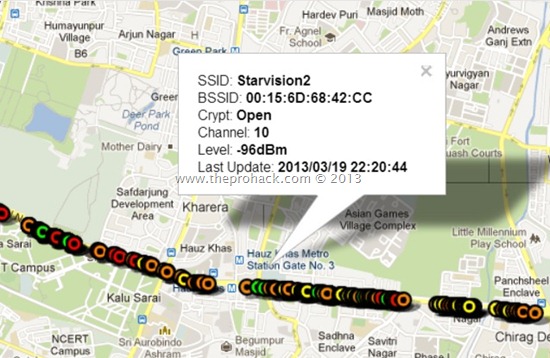
Wardriving at Delhi Updated –The OPEN, WEP & WPA faces of Delhi

I got an overwhelming response to my Wardriving at Delhi project and have got a lot of emails regarding the same. I am so thrilled that so many people want to contribute to the project. Inspired by your feedback, I am here by producing here an update to my mapping project. This time I went Via Saket to Gurgaon and as usual I got a lot of access points which were OPEN with no security, WEP secured vulnerable access points & WPA/WPA PSK2 secured points.
 Wardriving at Delhi Updated - The OPEN,WEP and WPA
As usual, I used -
The target is to make a map of Delhi with all the access points  to analyse in layman terms -
  1. The security awareness of people and organizations
  2. The devices they are using
  3. The security mechanisms they are using.
  4. Wifi range analysis of individual device.
Well, in all you can find the data from below links -
If you are interested in contributing to the data, please contact me at admin<at>theprohack.com . You can also read how to Hack Wifi using Backtrack , How to detect if someone is using your WiFi  or how to detect WiFi hotspots . If you are having an Android, you can also read about how to use your Android for Wardriving.

Happy Wardriving.

Best Hackers of India–Revealed

I have had enough..I am very very pissed off as India has become the land of the skids & the greatest contribution to the same has been provided by imitators of Fadia business model ..And for the time being they are having good business by making fool of naive minds. Nowadays everyone I see (and meet) is a freelance security consultant, without even knowing the basics and intricacies of Security as process,acumen,method & lastly knowledge.

When I ask them, "Oh great, nice to meet you, so what you have been working on lately?"

The answer is cryptic bullshit about using Trojans, hacking Facebook profiles (using *means*..duh) , pentesting websites (using haviz/acunetix or automated tools without doing any static code analysis, or XSS'ing the website without even the hint of persistent ones) ,servers and even SEO (!).

A more advanced skid one will babble about using Backtrack/KALI and impress by using metasploit to show how exploits are run to compromise systems (insecure one, also in place of writing their own they just update it) , bit of showing connections to underground scene (wait what ?!) & having everyone by a cryptic handle in their Facebook profiles. 

"Nice..So..what is *new* that you are working on lately?" I exclaim.

The media ?

Well..it goes apeshit whenever they hear about hacking prodigies. Well to uneducated media journalists, let it be known to you, RESEARCH BEFORE YOU VOMIT ANYTHING. Why don't you go through Charles Assisi's Article on Ankit Fadia and LEARN SOMETHING ?!!

Worst part - These guys are even authoring books on hacking. Go figure :/

Every time some hacking prodigy or best hacker releases a book on "guide to hacking" with age old obsolete (& mostly stolen) content, a cute bunny performs harakiri with his copy of Sn0wcrash somewhere .

Point in question is that NONE OF THE GUYS WHO PROCLAIM to be the BEST HACKERS IN INDIA have never appeared in reputable security conferences to show their mettle. Instead, they have created their own versions of DEFCON & HACKING CONFERENCES so that they can sing songs about their privates in full glory.

    PS: Every time I read Norman Shark's report on an Indian APT, I have a facepalm, just saying. How on earth it was classified as an APT is beyond me.But again, not diverting too far from my point, back to Hackers.

I owe to a lot of people ; yes, every pro was a skid, I admit it, however what separates a skid or a Charlatan from a true 1337/seasoned security researcher is their attitude towards learning, reproducing, validating and then putting their own blood,sweat & tears into research to advance it. 

I have met a quite a lot of talented folks in corporate world and have got the privilege to work with some extremely talented people in network security (I am looking at you fambon/jach/m0d412 =] ). Having watched the scene carefully, I wanted to make note of some of most talented folks in Indian security scene today,  people who are Hackers (whether they acknowledge it or not) and are not *self proclaimed Hackers/best Hackers/leets* (guys you will find dime a dozen).  Seriously guys..where is Halvar Flake of India?

I wanted to do it as they have made significant contribution to the Indian hacking scene , be it awareness,exploits,pwnage or anything, they have been doing what is needed today , rather than to create an army of skids that gave everyone a bad name.

Of course you will argue that the real guys are always hiding in the shadows (read:null) & there are a lot who are working behind the scenes,but still these are the ones you would like to know about (in no particular order).

1.  Sanjay Rawat

Sanjay Rawat
Veteran security researcher specializing into Code optimization, Machine learning,VA,fuzzing and Network security. One of my heroes I look & greatly idolize.

2.  Rahul "fb1h2s" Sasi

Rahul Sasi
I have known Sasi since quite some time, & he is the current torch bearer of the face of Indian hackers, his research into HID devices-Biometrics,Datacards,IVR has recieved widespread attention and has given Indian security scene a good name.

  PS: Rahul, if you are reading this , I chose this pic as this makes you resemble more like a cross between Alan Cox & Cory Doctorow, some offbeat folks I greatly admire, no kidding : P

3.  Vinay "Vinnu" Katoch
Long time L0Xian has impeccable skills in exploit development, reverse engineering ,malware analysis and development. Known for his exploits in JVM,ASLR/DEP bypass and his quite nature.


4.  Vivek Ramachandran
Vivek Ramachandran

Well, how he can be even missing from this list. His famed Café Latte Attack & his latest primer on making security accessible to everyone via Securitytube has helped millions to learn security the right way, at least the nascent steps. Kudos to him.

5.  Rajshekhar Murthy / Atul Alex Cherian
The Malc0n duo is quite infamous for bringing raw,uncensored malware research,development into the spotlight. Malc0n exclusively focuses on proactive malware research and analysis & the responsible folks have been instrumental in making it an international platform.

Honourable mention : Folks at n|u,g4h,SX, I always take you for granted since you have always been 1337s, you don't need a lesser mortal to define your contribution to the scene.

I hope my rant was quite clear (!) , concise and to the point, I hope the next time you will hear about some Indian hacking prodigy in your local newspaper, Facebook page or on a poster at your college campus, you will QUESTION YOURSELF TWICE & ask the goodol' folks at n|u/SX/g4h for a piece of their mind.

If you want to go through the last time I ranted about the BEST HACKERS IN INDIA, click here.   You can also read more about Charlatans at Attrition.org, my favourite place to kill off time.

Just in case you might question my authority of ranting about the topic, then well, I hope you will get it someday.

Ultimate Guide to run ASA 8.4 on GNS3 on Ubuntu - No more Qemu errors

Simulating CISCO ASA 8.4 on GNS3, on Ubuntu is a pain in the ass. Countless QEMU errors ,203 errors, results with no output on console and many more hair-pulling skull bashing events that *will* make you scratch your head and you will be motivated to buy an ASA for your personal use.
Yes folks..You will be running this..or a cousin of it.
But fear not weary travelers if you have reached at this point of web while surfing (read:hunting) for your share of ASA & firewall stuff, you are right at home. Today I will be providing a step by step almost error free guide of simulating ASA, and fret not, this has been tested on more than 5 platforms with zero error rate (and that included machines of different platform - i386,x86_64; and different flavors of Fedora/Ubuntu).

NOTE: I love linux but I hate Ubuntu, for my own personal reasons. I am a fedora guy & I love debian, but I hate Ubuntu.
Why I didnt covered this guide for Fedora  as Fedora guys will figure out how to do it anyways :P , its Ubuntu ones who were facing maximum issues (just google it) and hence I wanted to cover a guide for it. Jokes aside, I intend to cover the subjected issue as I faced multiple issue myself.

Never-mind, my machine as of now is an amd64 E350 based HP dm1 3210 Laptop with 4 GB ram. Its a pretty under powered PC for running GNS3 (as compared to dedicated rigs I have seen, however I can run IOU & NX-OS Titanium over it and it balances every known equation for me) but it does the job with some tweaking and the result is very satisfactory.

Coming to the point, you will be needing -
  1. A laptop/desktop
  2. Any Ubuntu flavor installed (I use backbox, its better than backtrack)
  3. ASA 8.4.x files (initrd and kernel files, if you are reading this article, I know you have them)
  4. Patience.
Step 1 -  Installing GNS3

Well this is simple, just type the commands and it will install safely. Make sure you dont have GNS3 installed previously else you might face some issues. Please note I am using compiling GNS3 for my 64 bit OS, however it should work for 32 but laptops too, make sure you choose correct version of dynamips from GNS3 website.
 rishabh@xion$cd /opt
 rishabh@xion$sudo mkdir GNS3
 rishabh@xi0n:/opt$ wget http://sourceforge.net/projects/gns-3/files/GNS3/0.8.3.1/GNS3-0.8.3.1-src.tar.gz
 rishabh@xi0n:/opt$ unzip GNS3-0.8.3.1-src.zip
 rishabh@xi0n:/opt$ sudo mv -f /GNS3-0.8.3.1-src/* /opt/GNS3
 rishabh@xi0n:/opt$ sudo chmod 777 GNS3
 rishabh@xi0n:/opt$ cd GNS3
 rishabh@xi0n:/opt/GNS3$ sudo mkdir Dynamips Images Project Cache tmp
 rishabh@xi0n:/opt/GNS3$ sudo chmod 777 Dynamips/ Images/ Project/ Cache/ tmp/
 rishabh@xi0n:/opt/GNS3/Dynamips$ cd Dynamips/
 rishabh@xi0n:/opt/GNS3/Dynamips$ http://sourceforge.net/projects/gns-3/files/Dynamips/0.2.8-RC3-community/dynamips-0.2.8-RC3-community-x86_64.bin
 rishabh@xi0n:/opt/GNS3/Dynamips$ export PATH=$PATH:/opt/GNS3/GNS3-0.8.3.1-src/
Check if its installed by opening a terminal window and running GNS3. If it went well, proceed to next step.

Step 2 - Compiling and Patching QEMU

This is the second most crucial step, do as instructed, by the time you are finished, you will be presented with a stable installation of patched Qemu. Make sure NO previous installation of Qemu in installed on your machine.
rishabh@xion:/opt/GNS3$ wget http://download.savannah.gnu.org/releases/qemu/qemu-0.11.0.tar.gz
rishabh@xion:/opt/GNS3$tar xvzf qemu-0.11.0.tar.gz
rishabh@xion:/opt/GNS3$cd qemu-0.11.0
rishabh@xion:/opt/GNS3/qemu/qemu-0.11.0$wget http://downloads.sourceforge.net/gns-3/qemu-0.11.0-olive.patch?download
rishabh@xion:/opt/GNS3/qemu/qemu-0.11.0$patch -p1 -i qemu-0.11.0-olive.patch
rishabh@xion:/opt/GNS3/qemu/qemu-0.11.0$./configure --target-list=i386_softmmu
rishabh@xion:/opt/GNS3/qemu/qemu-0.11.0$make
rishabh@xion:/opt/GNS3/qemu/qemu-0.11.0$sudo make install
Once its installed, check by running
rishabh@xi0n:/opt/GNS3/qemu/qemu-0.11.0$ which qemu
/usr/local/bin/qemu
It should display Qemu path, if not, you screwed up some where. Do it again.

Step 3 - Preliminary Configuration

In general settings of GNS3, you will find Qemuwrapper is already configured, double check Qemu & Qemu-img path here, it should be the same as mentioned in "which" command output or better if you have placed the same it in GNS3 folder

Also, Set ASA options as
 Qemu Options:
 -vnc none -vga none -m 1024 -icount auto -hdachs 980,16,32
 Kernel cmd line:
 -append ide_generic.probe_mask=0x01 ide_core.chs=0.0:980,16,32 auto nousb console=ttyS0,9600 bigphysarea=65536
Browse to the initrd & kernel images of ASA and set memory to 1024, once done, save it.

make sure your configuration looks like this


When done, its execution time follks :)

Step 4 - Running it.

Well..it will look like this.


You can also check the ps output of Qemu (quick and dirty output here..nothing flashy)
rishabh@xi0n:/opt/GNS3$ ps ax | grep 'qemu'
 7094 pts/0    Sl+    0:00 /usr/bin/python /opt/GNS3/GNS3-0.8.3.1-src/qemuwrapper/qemuwrapper.py --listen 127.0.0.1 --port 10525 --no-path-check
 7101 pts/0    SN+    0:00 /bin/sh -c /usr/local/bin/qemu -name ASA1 -m 1024 -hda "/tmp/ASA1/FLASH" -kernel "/home/rishabh/Documents/asa842-vmlinuz" -initrd "/home/rishabh/Documents/asa842-initrd" -append "-append ide_generic.probe_mask=0x01 ide_core.chs=0.0:980,16,32 auto nousb console=ttyS0,9600 bigphysarea=65536" -net nic,vlan=0,macaddr=00:00:ab:40:a4:00,model=e1000 -net nic,vlan=1,macaddr=00:00:ab:8d:12:01,model=e1000 -net nic,vlan=2,macaddr=00:00:ab:f0:c0:02,model=e1000 -serial telnet:127.0.0.1:3001,server,nowait -vnc none -vga none -m 1024 -icount auto -hdachs 980,16,32
 7102 pts/0    R+     0:19 /usr/local/bin/qemu -name ASA1 -m 1024 -hda /tmp/ASA1/FLASH -kernel /home/rishabh/Documents/asa842-vmlinuz -initrd /home/rishabh/Documents/asa842-initrd -append -append ide_generic.probe_mask=0x01 ide_core.chs=0.0:980,16,32 auto nousb console=ttyS0,9600 bigphysarea=65536 -net nic,vlan=0,macaddr=00:00:ab:40:a4:00,model=e1000 -net nic,vlan=1,macaddr=00:00:ab:8d:12:01,model=e1000 -net nic,vlan=2,macaddr=00:00:ab:f0:c0:02,model=e1000 -serial telnet:127.0.0.1:3001,server,nowait -vnc none -vga none -m 1024 -icount auto -hdachs 980,16,32
 7175 pts/1    S+     0:00 grep --color=auto qemu
Once you are up and running, its time to grab a can of redbull (or beer if you prefer) and get a pat on your back, good work soldier :)

Miscellaneous Errors , which you *just might* encounter and how to deal with them.

If you followed my steps, I dont think you will encounter any errors, but for the sake of completeness, I am including the most basic errors which you might get.

"qemuwrapper path doesn't exist"
This one is a classic one. With proper GNS3 0.8.3x installation, you will *not* encounter it. If you are running classic 0.7.x build, God save you. Even if you have 0.8.3.x & still get this error , find Qemuwrapper (it will be there in one of GNS3 source folders) and select it, save it. Error gone. Make sure permissions are correct.

 "203-Bad number of parameters (5 with min/max=6/6)"
 Upgrade your GNS from 0.7x.x to 0.8.3, if you are following this guide, you should not get this error.

 "You are running an old and unpatched version of qemu"
Now here things get interesting. In one case I installed Qemu before installing GNS3 and I got this error quite frequently. I uninstalled Qemu, cleared my /tmp & I then first installed GNS3 and then installed Qemu after configuring GNS3 fully (except the Qemu part that is) . Did a sudo make install for Qemu and restarted my laptop. Please note I am using Qemu 0.11
Ran GNS3 and tada..


This error will be rectified.

 "You must use 'manual mode' to connect a link with a xyz module"
 Simple as hell, use manual mode..duh..

 "QEMU boots but no ASA boot output on console"
 Use correct QEMU binary, no Qemu_i386 / Qemu_x86_64. Use only correctly patched Qemu 0.11 binary in GNS3 like previously specified.

In all cases, all errors are either will be some permutation or combination of the mentioned ones. Well , it summarizes my post on running ASA, hope it will help you.

Rishabh Dangwal

Hack Windows using winAUTOPWN 3.4 –Completing 4 years of windows hacking

winAUTOPWN has been an old favourite to automate windows hacking and vulnerability testing.  The project is the brainchild of Azim Poonawala of [C4]Closed Circuit Corporate Clandestine and saw its first release in 2009. Fast forward to 4 years; it has matured into a good exploitation framework with a plethora of options. As the Author states about it  -

Autohack your targets - even if you have consumed and holding a bottle of 'ABSOLUT' in one hand and absolute ease (winAUTOPWN) in the other.

In layman terms, winAUTOPWN is a unique exploit framework which helps in gaining shell access and pwning (aka exploiting vulnerabilities) to conduct Remote Command Execution, Remote File/Shell Upload, Remote File Inclusion and other Web-Application attacks. To add cherry on the top, it can also help in conducting multiple types of Denial of Service attacks on targets, furthermore, It can also be used to test effectiveness of IDS/IPS and other monitoring sensors/softwares.Hack Windows using winAUTOPWN 3.4 –Completing 4 years of autopwnage

You can -

  • Download winAUTOPWN from here / mirror
  • Read its documentation from here

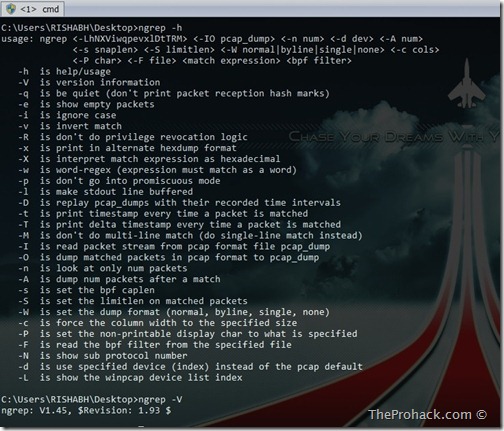
Ngrep–Grep patterns in Network traffic

We have got a lot of packet sniffer/analyzer software out there, I am a self confessed Wireshark & Ettercap lover, but still, when it comes to analyzing network traffic from command line in a fast manner, ngrep is my one of my favourites. Written by Jordan Ritter its used to “grep” traffic patterns from the network interfaces. As per official documentation -

ngrep is a pcap-aware tool that will allow you to specify extended regular or hexadecimal expressions to match against data payloads of packets. It currently recognizes IPv4/6, TCP, UDP, ICMPv4/6, IGMP and Raw across Ethernet, PPP, SLIP, FDDI, Token Ring and null interfaces, and understands BPF filter logic in the same fashion as more common packet sniffing tools, such as tcpdump and snoop.

ngrep runs on Windows & *nix platforms alike and you need WinPCAP to run it since it relies on it. 

Ngrep–Grep patterns in Network traffic - Theprohack.com

Once you install it, it by default uses the first interface on your machine, so , make sure to check the detected interfaces by running -

C:\Users\RISHABH\Desktop>ngrep -L
idx     dev
---     ---
1:     \Device\NPF_{4D491111-D331-42BC-9A33-98EF8C40D422} (Microsoft)
2:     \Device\NPF_{ADBF6AC1-D111-463D-8D99-C58FA1BEF979} (Sun)
3:     \Device\NPF_{6F801AE0-CA61-4A6D-B5FF-DCB7CE8FC529} (VMware Virtual Ethernet Adapter)
4:     \Device\NPF_{930B6EC8-A5E3-4FFA-B68F-F159FDFC2064} (VMware Virtual Ethernet Adapter)
5:     \Device\NPF_{D1999293-A041-4C2A-B63F-5D8B4906000F} (Realtek PCIe GBE Family Controller)
exit

Now for example you want to check out whats going on at port 23 using interface 5

C:\Users\RISHABH\Desktop>ngrep -d 5  port 23
interface: \Device\NPF_{D1999293-A041-4C2A-B63F-5D8B4906000F} (192.168.1.0/255.255.255.0)
filter: (ip or ip6) and ( port 23 )
exit
0 received, 0 dropped

Piece of cake.. and if you want to filter any website in you are searching for keyword "password" then :

ngrep -d 5 “password” port 80

Easy aint it ? Ngrep does it all : ] With some complex grep commands , you can become a pcap ninja.

Well, you can

  1. Download Ngrep from here
  2. Check out documentation and examples here
  3. Learn about Wireshark from here

Cisco Type 4 Passwords cracked–Coding mistake endangers devices

Cisco has issued a security advisory intimating that its new password hashing algorithm TYPE 4 is vulnerable,which allows Cisco TYPE 4 encoded hashes to be cracked easily. TYPE 4 is an update of TYPE 5 , and was supposed to salt passwords and apply 1000 iterations of SHA-256 .  Well, engineers at Cisco actually miscoded the algorithm by forgetting to salt passwords and setting the number of iterations to 1 which makes it even weaker than TYPE 5 algorithm .

“This approach causes a Type 4 password to be less resilient to brute-force attacks than a Type 5 password of equivalent complexity.”

Also, the code base (CISCO IOS 15) also disables TYPE 5 encryption on devices. Well..talk about rubbing salt on wounds.

Cisco Type 4 Passwords cracked–Coding misfire endangers hardware - - TheProhack.com

As per advisory -

"A device running a Cisco IOS or IOS XE release with support for Type 4 passwords lost the capability to create a Type 5 password from a user-provided plaintext password.Backward compatibility problems may arise when downgrading from a device running a Cisco IOS or IOS XE release with Type 4 password support and Type 4 passwords configured to a Cisco IOS or Cisco IOS XE release that does not support Type 4 passwords. Depending on the specific device configuration, the administrator may not be able to log in to the device or to change into privileged EXEC mode, requiring a password recovery process to be performed."

It was meant to be discovered inevitably. Folks at Hashcat - Philipp Schmidt and Jens Steube found it and were able to decode a hash posted at inetpro.org . Since hashes were weak, the information was more than enough to crack millions of hashes in hours if anyone gets their hands on hashes. 

The aftermath ? Cisco says it will be creating new password type to counter it with new as of now unknown commands to implement it.  In the meantime, Cisco says you “may” want to replace Type 4 password with Type 5 , as quoted -

There are two options to generate a Type 5 password:

  • Using another device running a Cisco IOS or Cisco IOS XE release without Type 4 support
  • Using the openssl command-line tool (part of the OpenSSL Project)

You can read the advisory here

You might also want to read  -

CARNA Botnet–Researcher maps Internet using botnet

“ Incredible”

thats one word when you describe CARNA botnet, which is a single handed attempt to map the entire Internet by a researcher, which makes it a single most herculean feat I have witnessed in digital domain which both grips me with mixed feelings of  astonishment and Deja Vu.

CARNA Botnet–Researchers map Internet - theprohack.com

As the paper states, the basic theory behind CARNA was

After completing the scan of roughly one hundred thousand IP addresses, we realized the number of insecure devices must be at least one hundred thousand. Starting with one device and assuming a scan speed of ten IP addresses per second, it should find the next open device within one hour. The scan rate would be doubled if we deployed a scanner to the newly found device. After doubling the scan rate in this way about 16.5 times, all unprotected devices would be found; this would take only 16.5 hours. Additionally, with one hundred thousand devices scanning at ten probes per second we would have a distributed port scanner to port scan the entire IPv4 Internet within one hour.

Impressive..  and the payload they devised was small, surgical and targeted routers with insecure logins.

The binary on the router was written in plain C. It was compiled for 9 different architectures using the OpenWRT Buildroot. In its latest and largest version this binary was between 46 and 60 kb in size depending on the target architecture.

Well, the end results ? ~ 420,000 infected routers are identified with 1,300,000,000 geolocated IPV4 devices with about one-third of those responding directly to pings.

Incredible..as I earlier said. Sceptics will say that It can be a hoax, as its difficult to verify with a 586GB bittorrent file compressed with ZPAQ which will decompress to 9TB , it needs somewhat of super human effort to download, unpack and analyze data if it really exists. But again, if its true, Its .. its awesome.

You can

  1. Read the Paper here
  2. Download Bit Torrent file here
  3. See graphical results here

Like I said, prepare to be amazed.

Vulnerable SCADA systems in Finland – Shodan,Hackers and Security.

Security researchers in Finland have turned up thousands of unsecured Internet-facing SCADA systems in that country, using the Shodan search engine.The researchers, from Aalto University, ran their test in January, and found 2,915 exposed systems running functions from building automation to transport and water supply. Those responses were out of a total of 185,000 Finnish IP addresses that responded to an HTTP request. Vulnerable SCADA systems in Finland - Shodan, Hackers and Security

According to communications and networking professor Jukka Manner,exposed building automation systems, the researchers claimed, included a bank, a gaol, and a hospital.  Researchers claimed that many systems were vulnerable through their remote user interfaces.Interestingly, when the university re-ran its test in March, it found that a large number of the systems had been removed from the Internet, although 1,969 of the systems were still present.

“A lot of problems can … still be hiding”,

according to research assistant Seppo Tillkainen, since as much as 30 percent of the Finnish IP address space is still not mapped by Shodan. While systems spotted in the Shodan search even included a wind turbine, the majority of poorly-secured systems were in office blocks and residential towers, the study says. The researchers did not go as far as to actually try to penetrate the systems, citing Finland's computer crimes laws.

A Google translation of the university's press release is here. For Finnish readers, the whole study is here.


Blogged on Android Via The Register

LinkedIn Malware - Profiles hit with 청강아카데미학원

Recently I have noticed a lot of LinkedIn profiles (especially belonging to Indian subcontinent) have mentioned “청강아카데미학원” in their educational details (Go Google). On further querying with friends and some readers have got an identical response that NO changes have been made from user end. Its a suspected XSS hit and LinkedIn team have been notified. Will update here if I get a response.

LinkedIn Malware  - Profiles hit with malware - Prohack

LinkedIn Malware  - Profiles hit with malware - Prohack

Hacking Dominos Coupon Generator – Free Dominos Pizza Coupons & Discounts

After multiple failed attempts to place an order of pizza and getting tired of taking follow-ups from folks at Axis Bank and Bill Desk (the gateway that  takes care of Dominos's online pizza orders) , I was frustrated a lot. Then , I came across Domino's Slot machine coupon generator. An innocent looking random coupon generator that is purely JS based and is easily hackable. NOW I AM NOT SAYING I HACKED IT AND ORDERED FREE PIZZA's , the payment gateway sucks soo much that I didn't ordered anything. But yes, I do have something to share with you.

Fire up your Google Chrome (that's enough) and open

http://pizzaonline.dominos.co.in/slot-machine/process-slot.php

You will see the Coupon Generator, fill in the captcha and play it, in normal circumstances , chances are -

  • You will win a coupon , if you are feeling lucky, you can try once more and then if you win again, you will have to deal with the final discount coupon you get.
  • You will get a "Try Again", you can try till the case 1 is fulfilled.

Go to Dominos Coupon Generator

Lets turn the tables ,fire up developer console by pressing F12 .

Fireup Developer Console - the prohack.com

navigate to scripts – > slot.jsGo to Slots.js - theprohack.com

Open slots and navigate to this code

change values - theprohack.com

and change the attempts value to anything you wish

change values - theprohack.com


Now navigate to this code

change values - theprohack.com

and change the value to 1

change values - theprohack.com

Now time to change duration values

$('#slot'+(slots+1)).animate( { backgroundPosition:"(0px "+bgPos+"px)"}, { duration: (10000+(slots*500)), complete: function(){
limit++; //console.log(limit);
if(limit == 4){


Change the subjected function to

$('#slot'+(slots+1)).animate( { backgroundPosition:"(0px "+bgPos+"px)"}, { duration: (1+(slots*1)), complete: function(){
limit++; //console.log(limit);
if(limit == 4){

once done , slot timers and duration will be ultra quick.

Press Ctrl + S and click on Start / Try Again and see the results : ) Cool huh ? 

Now tinker with some innocent looking functions for your experiment : ] and enjoy.

Check this For loop and especially check for #slot values and value of i , also, some crazy things can be done by changing the pixel values

if(buttonState == 'Try Again' || buttonState == 'Please wait...'){
               var i=1;
               for(i=1;i<=4;i++)
               $('#slot'+i).css('background-position','0px 0px');
           }

Or Look for this function

$.post('process-slot.php',{ session_id : session_id},function(json){               
                var slot_result = slot_result_desc = ''; var limit = slots = 1;


Now again, I wont be divulging much here : P , you can modify completely the way the slot generator works and generate according to your whims : ] Work your way out.

Jackpot - theprohack.com - hacking Dominos Coupon Generator


PS : I did went into the site looking for coupons by being a Dominicon but the coupons there are just pathetic and almost same for all the traits like lazycon/freebicon etc.

Back to Cybernating.

Understanding DDOS Mitigation

Understanding DDOS Mitigation
Hi all,
Its been a long time since I have posted anything, sorry for the same. I hope you will be following my twitter feed/ facebook for updates of what I have been doing nowadays, if not, no problemo , I know we will still get along well. This time I will be covering DDOS mitigation methodologies which might come handy to you in long term. I actually though of hosting a free for all DDOS server for testing , but then, it didnt materialized well and I am sharing a concised view of my part which I covered . Please be noted I am only sharing what can be made public ;) 

Mikrotik Routers rock– Cheap, awesome and beats Cisco at same price

Working at Tulip Telecom has his own charm, you get your hands on an array of devices and lots of research . Well, i got my hands on Mikrotik routers, i have been working on themMikrotik routers rock - theprohack.com for a considerable amount of time (more than 6 months) and they are awesome. Here’s what i like in them -
  • Awesome Router OS
  • Extensive IP accounting which can segregate and display bandwidth utilization by IP,vlan,interface,source,destination .. and even more..you name it it has it.
  • 3G modem/VPDN support.
  • Extensive Queue and filter support, with ability to use burst limits and can be extended on individual interfaces, vlan etc. its a full fledged firewall provided you know how to use it.
  • Wi-Fi support.
  • Can do Email, SMS/SMS gateway..Hell..you can even run a PHP server inside Router OS
  • Supports MPLS , BGP, OSPF, Multicast ,DHCP
  • Netflow server
  • Packet capture, Wi-Fi snooper, packet capture can be opened using wireshark
  • Scripting support to insane levels
  • Hardware encryption
  • Easy to deploy
  • Stable..and Cheap
  • and much much more..
I would prefer it over a DD-WRT/Tomato enabled Linksys any day on a tight budget :) If only people knew about it..then i guess,picture would have been different for Cisco