Download Kinect Virtual Dressing Room - Weekend project

It was getting hot at Doha, Qatar and I was thoroughly bored. And tired.

Out of blue a creative request came by one of my seniors that if I have ever worked on Unity 3D. Though I have some experience with game engines and modeling tools, i though it would be worth a try. As an absolute beginner, I tried my hands on Unity 3D and was able to compile Virtual Dressing Room for Kinect (code courtesy Anthony heckmann - Github). I updated some code and calls (for instance  gettrianglestrip and settrianglesstrip to gettriangles and settriangles) for compatibility with latest release of Unity. As of now, have not tested it with a real Kinect although the executable works fine. Thanks to this project, I also got my hands on Kinesis.io.


You can download the executable from here . As usual, expect no support if you experience bugs as :

  1. Its my weekend project
  2. I have not tested it with a real Kinect.
  3. I have too much on my plate right now.
Password is Prohack
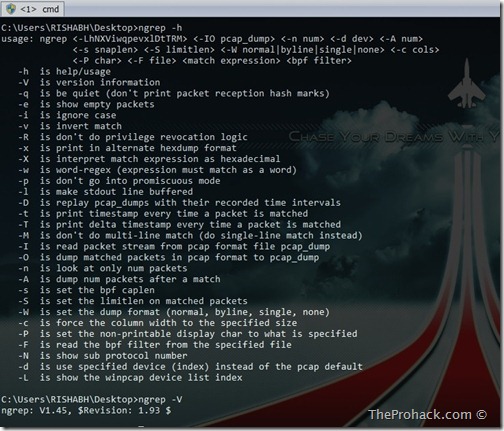
Ngrep–Grep patterns in Network traffic

We have got a lot of packet sniffer/analyzer software out there, I am a self confessed Wireshark & Ettercap lover, but still, when it comes to analyzing network traffic from command line in a fast manner, ngrep is my one of my favourites. Written by Jordan Ritter its used to “grep” traffic patterns from the network interfaces. As per official documentation -

ngrep is a pcap-aware tool that will allow you to specify extended regular or hexadecimal expressions to match against data payloads of packets. It currently recognizes IPv4/6, TCP, UDP, ICMPv4/6, IGMP and Raw across Ethernet, PPP, SLIP, FDDI, Token Ring and null interfaces, and understands BPF filter logic in the same fashion as more common packet sniffing tools, such as tcpdump and snoop.

ngrep runs on Windows & *nix platforms alike and you need WinPCAP to run it since it relies on it. 

Ngrep–Grep patterns in Network traffic - Theprohack.com

Once you install it, it by default uses the first interface on your machine, so , make sure to check the detected interfaces by running -

C:\Users\RISHABH\Desktop>ngrep -L
idx     dev
---     ---
1:     \Device\NPF_{4D491111-D331-42BC-9A33-98EF8C40D422} (Microsoft)
2:     \Device\NPF_{ADBF6AC1-D111-463D-8D99-C58FA1BEF979} (Sun)
3:     \Device\NPF_{6F801AE0-CA61-4A6D-B5FF-DCB7CE8FC529} (VMware Virtual Ethernet Adapter)
4:     \Device\NPF_{930B6EC8-A5E3-4FFA-B68F-F159FDFC2064} (VMware Virtual Ethernet Adapter)
5:     \Device\NPF_{D1999293-A041-4C2A-B63F-5D8B4906000F} (Realtek PCIe GBE Family Controller)
exit

Now for example you want to check out whats going on at port 23 using interface 5

C:\Users\RISHABH\Desktop>ngrep -d 5  port 23
interface: \Device\NPF_{D1999293-A041-4C2A-B63F-5D8B4906000F} (192.168.1.0/255.255.255.0)
filter: (ip or ip6) and ( port 23 )
exit
0 received, 0 dropped

Piece of cake.. and if you want to filter any website in you are searching for keyword "password" then :

ngrep -d 5 “password” port 80

Easy aint it ? Ngrep does it all : ] With some complex grep commands , you can become a pcap ninja.

Well, you can

  1. Download Ngrep from here
  2. Check out documentation and examples here
  3. Learn about Wireshark from here

EIGRP Cheatsheet – EIGRP in 15 min

EIGRP Cheatsheet – EIGRP in 15 min

Long time folks, was busy with a lot of projects. Hope coming year gets less busier and I get to get my hands more dirty on networks and network security. In the meantime, here is an EIGRP cheat sheet which I thought will be helpful to folks who just want a quick theory review of Cisco’s EIGRP. Though I wanted to cover a lot more in cheat sheet like EIGRP technologies, planning but it would have defeated the purpose of cheatsheet. Never mind, I am preparing a more comprehensive EIGRP guide which I might publish soon depending on the feedback received. In the meantime, You can find the cheatsheet at Slideshare and Scribd.


Download SQL Injection tool - SQL injection automated software SQLMAP

Sqlmap is an open source command-line automatic SQL injection tool and its goal is to detect and take advantage of SQL injection vulnerabilities in web SQL Injection applications. Once it detects one or more SQL injections on the target host, the user can choose among a variety of options to perform an extensive back-end database management system fingerprint, retrieve DBMS session user and database, enumerate users, password hashes, privileges, databases, dump entire or user’s specified DBMS tables/columns, run his own SQL statement, read or write either text or binary files on the file system, execute arbitrary commands on the operating system, establish an out-of-band stateful connection between the attacker box and the database server via Metasploit payload stager, database stored procedure buffer overflow exploitation or SMB relay attack and more.Enthusiastics can experiment with its opotions and pwn many of the servers around,or can test their skills to secure their servers..but remember,SQL map is a tool,its might help you to find and apply vulnerabilities and injections,but in the end,you really must have a good knowledge of SQL some real pwning out there..
You Can download sqlmap 0.7 here:
Linux Source: sqlmap-0.7.tar.gz
Windows Portable: sqlmap-0.7_exe.zip

Project 64 – The best Nintendo 64 emulator

Project64 is a Nintendo 64 emulator which at first seemed to have popped up out of nowhere.Project64 is a Nintendo 64 Project 64 – The best Nintendo 64 emulator - More emulator articles @ PROHACKemulator for the Windows platform that was first released in 2001. It employs a plug-in system to allow other developers to implement their own software.It is a great, free Nintendo 64 emulator which can emulate a lot of the commercial n64 roms out there. Emulator meaning that Project64 creates an environment on your PC under which real N64 software can run and be played in much the same way as it would be on the original hardware system. Yep,that means you can play Nintendo 64 games on your PC at the comfort of your home. Of course you have to obtain the rom images of games,either dump them yourself,or remember,google is your best friend [;)] .
Project 64 is a very good emulator, probably the best Nintendo 64 emulator available, plays nearly every N64 game, every game I've tried has worked with a few errors.There are a couple of games with some emulation glitches, but this does not makes them unplayable.The Project 64 emulator promises to replicate directly the graphics that you would obtain when running an actual N64 with a television.
Download Project 64 – The best Nintendo 64 emulator
The emulator also comes with a built in cheat editor , which can help increase the longevity of games (obviously by cheating :P ,also it includes inbuilt cheats for many games.. how cool is that ?).Project64 is the closest thing you’ll get to the N64 without actually buying the console itself and it performs better than other Nintendo emulators.
Project64 is currently still under constant development and the last official release was on 1 April 2005 . Since then we are eagerly waiting for a new release.
You can download the version 1.6 from Project 64 Site  or by clicking here .

Posted by XERO . ALL RIGHTS RESERVED .


Mousezahn - Open source free fast traffic generator and packet crafter tool

Mausezahn is a free fast traffic generator written in C which allows you to send nearly every possible and impossible  packet. It is mainly used to test VoIP or multicast networks but also for security audits to check whether your systems are hardened enough for specific attacks.mztitle

Mausezahn can be used for example:

  • As traffic generator (e. g. to stress multicast networks)
  • To precisely measure jitter (delay variations) between two hosts (e. g. for VoIP-SLA verification)
  • As didactical tool during a datacom lecture or for lab exercises
  • For penetration testing of firewalls and IDS
  • For DoS attacks on networks (for audit purposes of course)
  • To find bugs in network software or appliances
  • For reconnaissance attacks using ping sweeps and port scans
  • To test network behavior under strange circumstances (stress test, malformed packets)

Mausezahn is basically a versatile packet creation tool on the command line with a simple syntax and context help. It could also be used within (bash-) scripts to perform combination of tests. By the way, Mausezahn is quite fast; when started on my old PIII-Laptop (1.4 GHz, Gigabit Ethernet) I measured 755 Mbit/s using the interface packet counters of an HP ProCurve 5400 switch.

Currently Mausezahn is only available for Linux platforms. Please do NOT PORT Mausezahn to Windows! (Here is a nice explanation why; I really share Felix von Leitner’s point of view.)

Yoiu can download Mausezahn here:

mz-0.40.tar.gz

Or read more here.

Like This post ?  You can buy me a Beer :)
