One of the things that have been pesking me since the time I moved on to Android Cyanogenmod 7 was that I was not able to sync Facebook Calendar with Google Calendar or Outlook. Also since I was unable to sync Facebook Calender with Google Calendar hence the I was not able to sync Facebook birthdays on Android . That make me thinking and I got some nifty methods to do the same.
Method 1 (Sync Facebook Birthdays on Google)
Install Ebobirthday application on Android
Open it and click on
menu – > Import – > Facebook
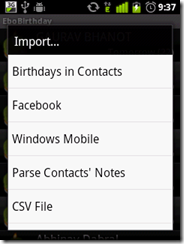
and let it connect to it.

Once connected enter your username and password, and allow it to access data. The it will start importing birthdays. Once done, click on
menu –> settings

and then choose calendar which you want to update.

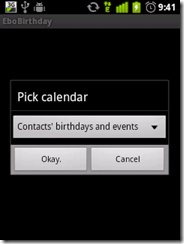
then go to
menu –> export –> update calendar

and then it will connect and will update your google calendar :)

Once done, sync your Android and Google. Alternatively you can sync outlook calendar with Google
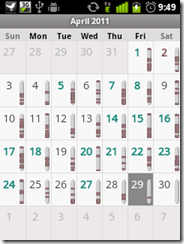

Congrats..you have synced Facebook calendar with Google and Outlook !
I will discussing the method 2 on my next post :)

Wow! I've been trying to do this ALL morning, and I managed to do it within 5 mins of reading your tutorial! Thank you so much for sharing!!!! :D
ReplyDeleteglad you liked it :)
ReplyDeleteAn alternate...
ReplyDeletehttps://market.android.com/details?id=com.muzurisana.birthdayfree
link to other method buddy.. :)
ReplyDelete